Give a Studio agent a real action with a connector
The leap from "agent that answers" to "agent that does" is a connector — wire one in so your agent can read and write to a real system, not just talk about it.
Stage: Copilot Studio · For: Maker, IT/Admin · Level: Advanced · Time: 25 min
Works on any harness — cost and coverage differ
This is a platform skill that applies whichever harness powers your agent. Keep one thing in mind: the standard and chat harnesses are covered by a Microsoft 365 Copilot license inside Microsoft 365 channels, while the GitHub Copilot harness bills Copilot Credits for all usage and a license never covers it. Compare the engines · estimate the net cost.
When to use this
Every agent up to now has answered. A Copilot Studio agent can act — look up an order, file a ticket, update a record, kick off a flow — by calling a connector into a real line-of-business system. This is the capability that justified climbing the whole ramp: an agent that takes action on your behalf, inside your systems, with your guardrails. It's also where IT becomes a true co-builder, because actions touch real data.
This is for makers building the action and IT/admins governing what the agent is allowed to reach.
What you'll need
- Copilot Studio access in the right environment, and permission to use the connector you need
- A target system with an available connector (Dataverse, SharePoint, a Power Platform connector, or a custom one)
- IT alignment on what the agent may read and write — before you wire it up, not after
Try it now — the prompt
Once the action is wired, the agent invokes it from natural language. Design the trigger phrasing deliberately:
When a user asks to check an order status, call the [connector] action with their
order number, return the status and expected date in one sentence, and if the
order isn't found, say so and ask them to confirm the number.
Why this works: it ties a user intent (check order status) to a specific action (the connector call), defines the inputs and outputs, and specifies the failure path — the four things a reliable action needs so it doesn't misfire on a bad input.
Step by step
- Add the action to your agent. In Copilot Studio, attach the connector and the specific operation the agent should be able to call.
- Map the inputs and outputs. Tell the agent what to pass in (the order number) and what to return — and keep the response tight so it doesn't dump raw fields at the user.
- Test with a real and a bad input. Run a known-good case, then a missing one, and confirm both the success and failure paths behave. Actions fail loudly when inputs are wrong — design for it.
- Lock the scope with IT:
Screenshots
Captured live in Microsoft Copilot Studio (Contoso environment). The product UI moves fast — if what you see differs, trust the numbered steps above, which we keep current.
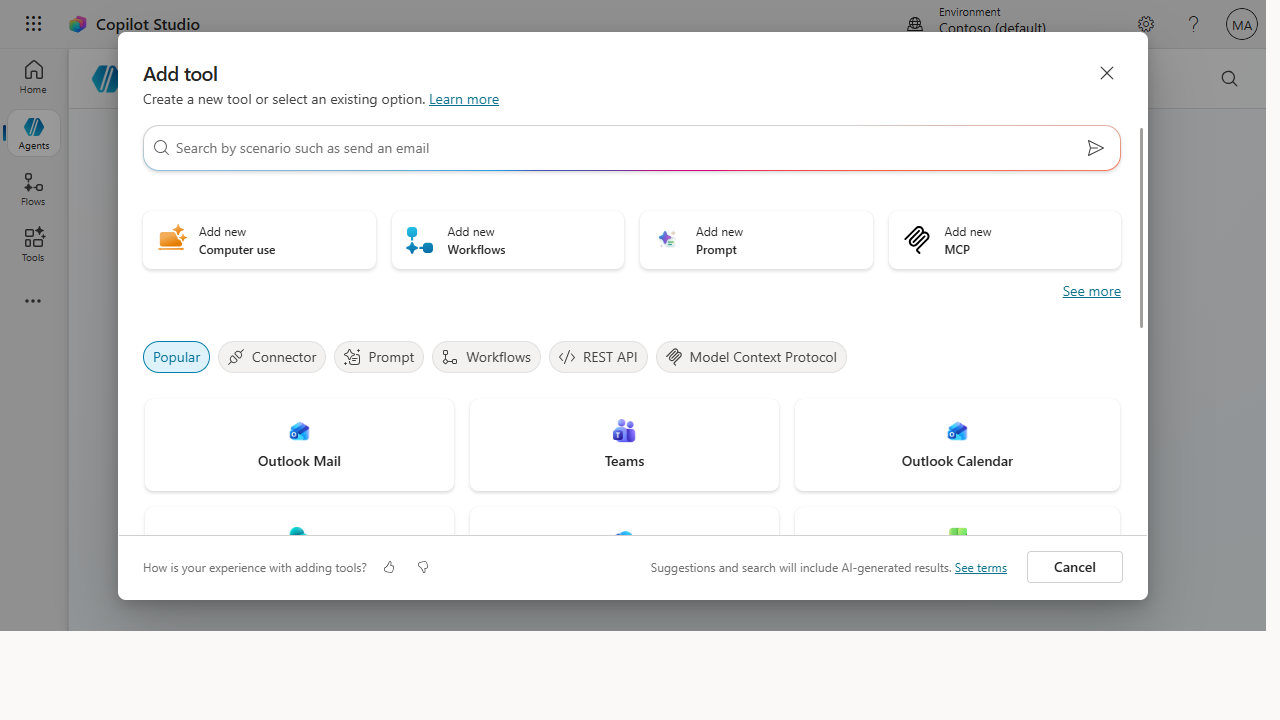 The Add tool gallery is where an agent stops just answering and starts acting — wire in a connector (Outlook, Teams, and hundreds more) to read and write a real system.
Make it better
One action is the start of a capable agent: - Chain the next step. Once it can read a record, teach it to act on one — "if the order's delayed, draft the customer a heads-up." That's where it earns its keep. - Add a confirmation gate. For any write action, have the agent confirm with the user before it commits — a human-in-the-loop step that prevents expensive mistakes. - Reuse across agents. A well-built action is a building block. Document it so the next agent you build can call the same one instead of reinventing it.
📚 Learn more. The Copilot Studio agent samples show working agents with actions you can learn from, and the microsoft/agent-resources repo collects build patterns. For the hands-on path, the Copilot Studio in a Day workshop walks through building actions end to end.
Watch out for
- An acting agent is a higher-stakes agent. When it can write to a system, a bug isn't a wrong answer — it's a wrong record. Test write actions harder than you'd test a Q&A, and gate them with confirmation.
- Scope the connector to least privilege. The agent should reach exactly the data the action needs and nothing more. This is IT's call to enforce, not a nice-to-have.
- Failure paths are not optional. Real systems return errors, timeouts, and not-founds. An action without a designed failure response will surface raw errors to users — design every unhappy path.
Where this leads (the ramp)
You've now built the thing this whole journey pointed at: an agent that takes real action inside your systems. From here the path is depth, not a new stage — richer actions, multi-step orchestration, and production-grade publishing. Build out from the working samples and the hands-on workshop.
Related
- Copilot Studio → Build your first Copilot Studio agent — the Stage 6 flagship
- Copilot Studio → Publish and govern your agent — what comes after it works
- Stage 6 Resources: see
RESOURCES.md→ Copilot Studio
Thanks — glad it helped. Spotted something to improve anyway? Suggest it →
Sorry this didn't land. Tell us what broke → so we can fix that rung of the ramp.
Found an issue or want to suggest an improvement? Open a GitHub issue · Star on GitHub