The first-party agents included with your M365 Copilot license
You're probably paying for agents you've never opened. Microsoft ships a roster of prebuilt agents inside the M365 Copilot license — this is the field guide to what each one is for, so you delegate to the right one instead of prompting from scratch.
Stage: First-Party Agents · For: Everyone · Level: Starter · Time: 10 min
When to use this
Start here before you build anything. The most common Stage 2 mistake is treating "agents" as one thing — or assuming they're an add-on you have to buy. Microsoft has already built a set of specialized agents and bundled them into the M365 Copilot license. Each one is tuned for a specific job: research, data, meetings, translation, project tracking. Knowing which agent owns which job is the whole skill — it's the difference between fighting a blank prompt and handing the work to a purpose-built worker.
This page is the roster and the routing table. The per-agent walkthroughs go deep; this is where you decide which one to open first.
What you'll need
- M365 Copilot license — the agents below are included with it at no extra cost (availability tiers differ; see the note under the table)
- The Agent Store / agents rail inside Microsoft 365 Copilot — where these agents live
- A real task to delegate, so you can match it to the right agent as you read
Try it now — the prompt
Not sure which agent owns your task? Ask Copilot to route you:
I need to [describe the task — e.g., "get smart on a competitor," "find the trend
in this spreadsheet," "catch up on a meeting I missed"]. Which of the built-in
M365 Copilot agents — Researcher, Analyst, Facilitator, Interpreter, Project
Manager — is built for this, and how should I phrase the ask to it?
Why this works: it turns "which agent?" into a job-to-be-done match. Naming the candidate agents forces a specific recommendation instead of generic Copilot advice — and it teaches you the roster by making you use it.
The roster — what each agent is for
Every agent below is built by Microsoft and reached from the Agent Store inside M365 Copilot. The "Use it for" column is the one-line job each one owns; the walkthrough link is the deep dive.
| Agent | Use it for (the specific job) | Go deeper |
|---|---|---|
| Researcher | A hard question that needs a multi-step investigation across your files and the web, returned as a cited brief — competitor moves, a technology you must get smart on, a market shift. | Deep-dive a topic with Researcher |
| Analyst | Turning a spreadsheet into insight — it reasons over your data (and can run Python) to find the trend, the top-N, the month-over-month change, and hand back a chart. The numbers partner to Researcher's narrative. | Analyze a dataset with Analyst |
| Facilitator | Real-time meeting notes in Teams — it captures decisions and action items live and produces the recap automatically, so nobody has to be the scribe. | Auto-recap every meeting with Facilitator ★ |
| Interpreter | Real-time speech translation in a Teams meeting so a cross-language call runs without a human interpreter in the loop. | Translate live with Interpreter |
| Project Manager | Tracking a plan — it turns a plan into tracked tasks, assigns and nudges owners, and surfaces what's slipping, working with Planner. | Keep a project on track with Project Manager |
| Agents in Channels | A shared agent dropped into a Teams channel so a whole team can self-serve answers from a common knowledge source — the team-wide version of a personal agent. | Post team-wide answers with Agents in Channels |
| Agents in Communities | The same idea in Viva Engage communities — a shared agent answering common questions where a broad community already gathers. | Answer in Viva Engage with Agents in Communities |
| Workforce / Workplace insights | Adoption and collaboration signals — where your team is getting value from Copilot and where they're underusing it, so champions can target enablement. | Track adoption with Workforce insights |
| Learning | In-the-flow upskilling — surfacing the right learning content (including LinkedIn Learning) at the moment someone needs a skill. | Upskill in the flow with the Learning agent |
| Employee Self-Service | Routine HR / IT questions — benefits, policies, "how do I…" — answered from approved sources so people don't have to file a ticket for the simple stuff. | Deflect routine tickets with Employee Self-Service |
A note on availability. These agents ship at different maturity tiers — some are generally available, others are in preview or rolling out through Microsoft's Frontier program, and what's included can change as Microsoft updates the license. Treat the Agents in Microsoft 365 hub as the source of truth for what's live for your tenant, and confirm with your IT admin before you build a process on a preview agent.
Step by step
- Open the Agent Store. Find it in the agents rail inside Microsoft 365 Copilot — this is where every first-party agent lives, alongside any your org has added.
- Match your task to the roster above. Research → Researcher. Data → Analyst. Meeting → Facilitator. Resist the urge to do it all in plain Copilot Chat when a purpose-built agent owns the job.
- Open the matching walkthrough and run its prompt. Each linked page has a ready-to-paste prompt and a "why it works." Start with the ★ Facilitator flagship if you're new to agents.
- Have Copilot pick for you when in doubt:
Screenshots
Captured live in the Microsoft 365 Copilot Agent Store (Work mode). The product UI moves fast — if what you see differs, trust the numbered steps above, which we keep current.
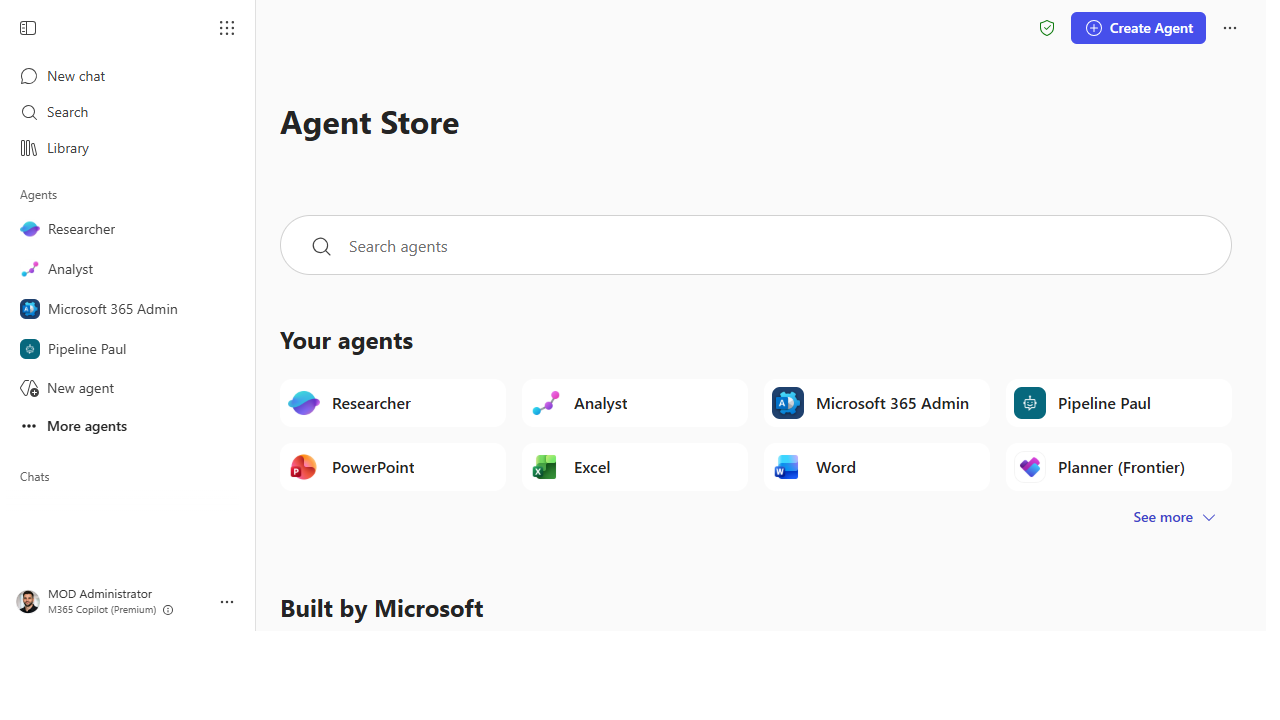 The Agent Store is the front door — your pinned agents in the left rail, the searchable catalog in the middle.
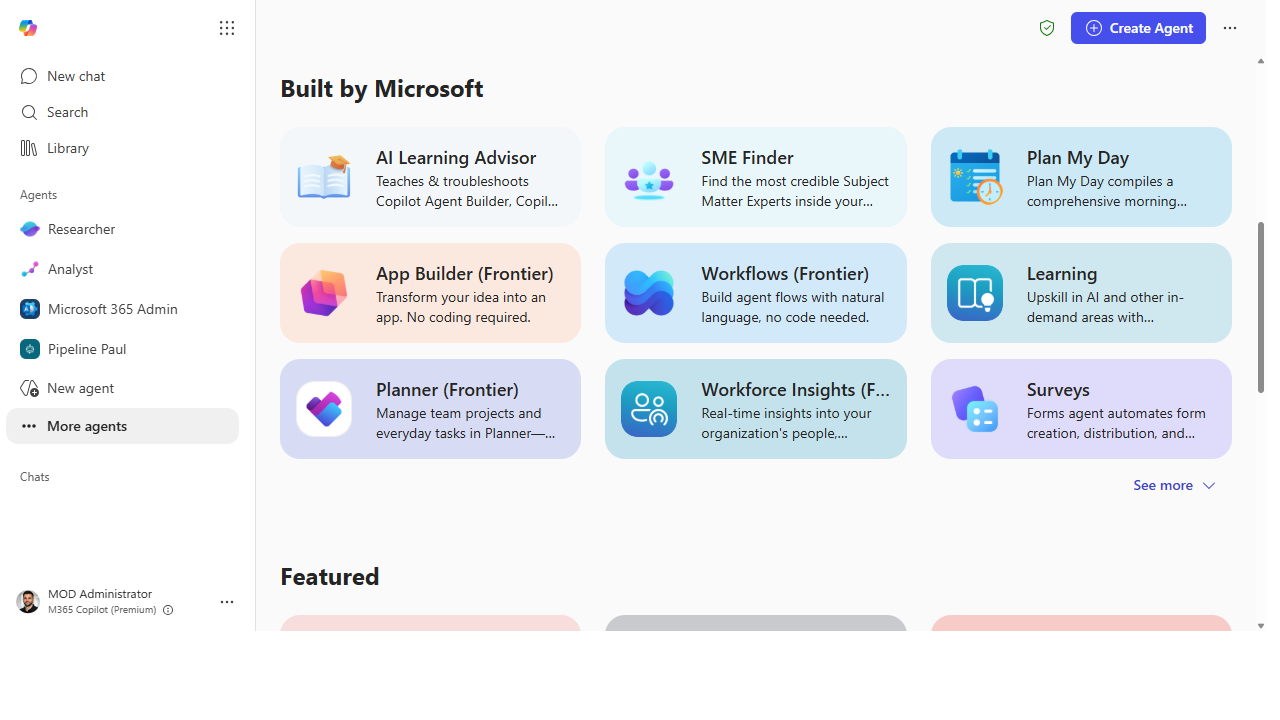 "Built by Microsoft" is the roster — Learning, Workforce Insights, Planner, Surveys and more, included with the license.
Make it better
The roster is most powerful when you stop using agents in isolation: - Chain them. Researcher frames the story, Analyst crunches the numbers behind it — the two-agent hand-off is the real first-party power move, and it's the rehearsal for orchestration later in the ramp. - Make the right agent the default. As a champion, the highest-leverage move is teaching your team which agent owns which job — most underuse comes from not knowing the roster, not from the agents. - Track what's new. Microsoft adds and graduates agents regularly. Re-check the hub quarterly so your team isn't sleeping on a built-in agent that solves a problem they're still doing by hand.
📚 Learn more. The Agents in Microsoft 365 hub describes each prebuilt agent in plain language, Jared Spataro's (CMO, AI at Work) post on Researcher and Analyst reaching general availability covers the two reasoning agents, and Nicole Herskowitz's (CVP, M365 Copilot) blog on human-agent teams explains how these agents work alongside you.
Watch out for
- "Included" doesn't mean "unlimited" or "everywhere." Some agents have usage limits, and availability varies by tier and tenant. Confirm what's live for you before you promise a process around one.
- The wrong agent gives a worse answer than plain Chat. Handing a data question to Researcher or a research question to Analyst wastes the specialization. Match the job to the agent.
- Preview agents can change. Anything not generally available may shift behavior or gating. Build durable processes on GA agents; treat preview ones as worth piloting, not standardizing on yet.
Where this leads (the ramp)
Once you've felt what a purpose-built agent does — plan, gather, synthesize, act — the next instinct is to hand off a multi-step task across your tools, not just a single research or data question. That's Stage 3 · Cowork: describe an outcome and let Copilot pull the inputs, do the work, and hand you a finished deliverable.
Next: First-Party → Auto-recap every meeting with Facilitator — the Stage 2 flagship, the best first agent to try
Related
- First-Party → Deep-dive a topic with Researcher
- First-Party → Analyze a dataset with Analyst
- First-Party → Keep a project on track with Project Manager
- First-Party → Post team-wide answers with Agents in Channels
- Stage 2 Resources: see
RESOURCES.md→ First-Party Agents
Thanks — glad it helped. Spotted something to improve anyway? Suggest it →
Sorry this didn't land. Tell us what broke → so we can fix that rung of the ramp.
Found an issue or want to suggest an improvement? Open a GitHub issue · Star on GitHub