Rewrite an email for a tougher audience
Take the rambling, slightly-too-honest draft you'd never actually send and turn it into something tight, diplomatic, and impossible to misread — in one prompt.
Stage: Copilot Chat · For: End user · Level: Starter · Time: 3 min · Saves: ~10 min vs. manual
When to use this
You've written the email. It says what you mean — but it's three paragraphs too long, a little defensive, and you're emailing a skeptical exec who skims. Rewriting it by hand means second-guessing every word. Instead, hand the draft to Copilot and tell it exactly who's reading and what you need them to do.
This is the most universal Copilot habit there is: almost everyone writes email, and almost everyone has sent one they wish they'd tightened first. It's a fast, low-stakes first win for a brand-new user.
What you'll need
- M365 Copilot license (Copilot in Outlook or the Copilot app)
- A draft email — even a messy one; the messier the draft, the more obvious the improvement
- A clear sense of the reader and the ask (skeptical exec? busy peer? frustrated customer?)
Try it now — the prompt
Paste your draft into Copilot and frame the rewrite around the audience:
Rewrite this email to be about 40% shorter and more direct, with a polite,
confident tone for a skeptical executive who skims. Lead with the ask, keep one
clear next step, and cut anything defensive. Don't change the facts.
Filled in — a budget approval request to a CFO
Rewrite this email to be about 40% shorter and more direct, with a polite,
confident tone for a CFO who is skeptical about the ROI and skims everything.
Lead with the budget ask and the expected return. Keep one clear next step.
Cut anything defensive or that explains why we need the budget. Don't change the facts.
Why this works: it names the reader (skeptical exec), the constraint (40% shorter), the structure (lead with the ask), and the guardrail (don't change the facts). Generic "make this better" gives you generic results; specifying the audience is what makes the rewrite land.
Step by step
- Open your draft and launch Copilot. In Outlook, use the Copilot rewrite/coaching option; or paste the draft into the Copilot app.
- Send the rewrite prompt. Copilot returns a tightened version with the ask up front and the tone dialed in.
- Read it in the reader's voice. Does the ask survive a 5-second skim? Did it keep every fact straight? This is where you catch anything over-softened or over-trimmed.
- Tune it without starting over:
Screenshots
Captured live in Microsoft 365 Copilot Chat (Work mode). The product UI moves fast — if what you see differs, trust the numbered steps above, which we keep current.
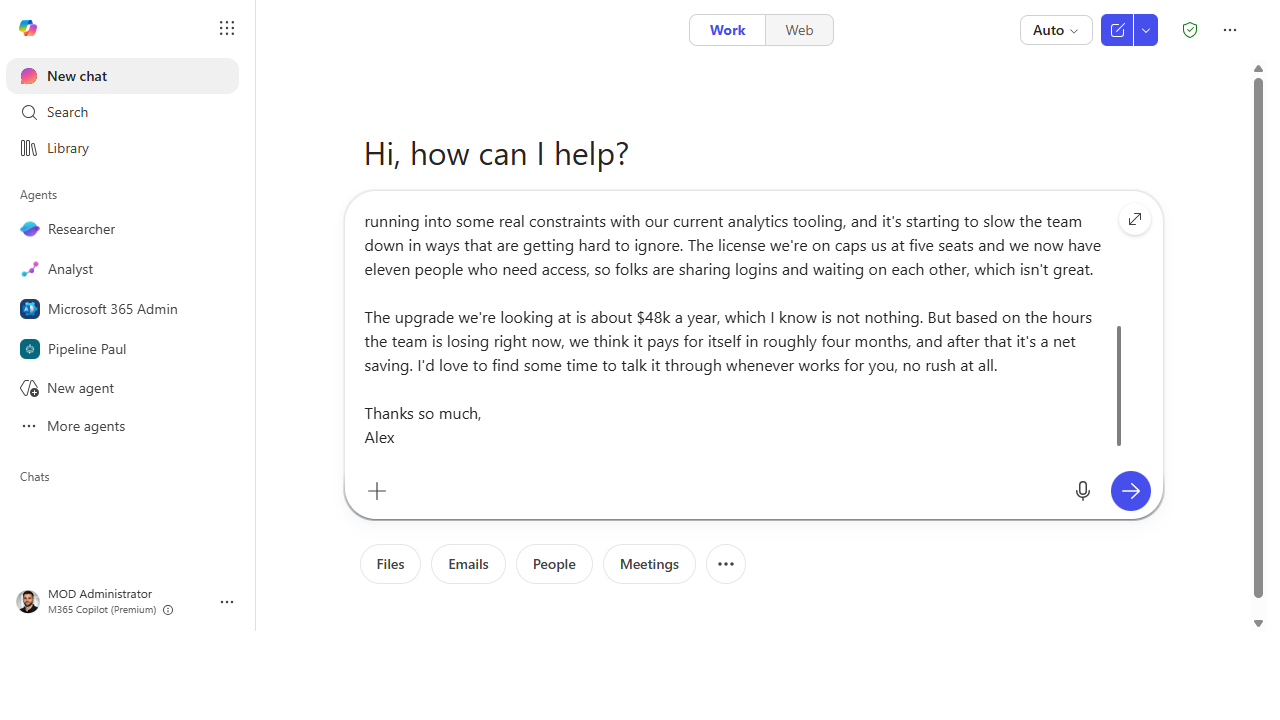 Hand it the draft and the audience. Paste the email and name the reader, the length, and the guardrails.
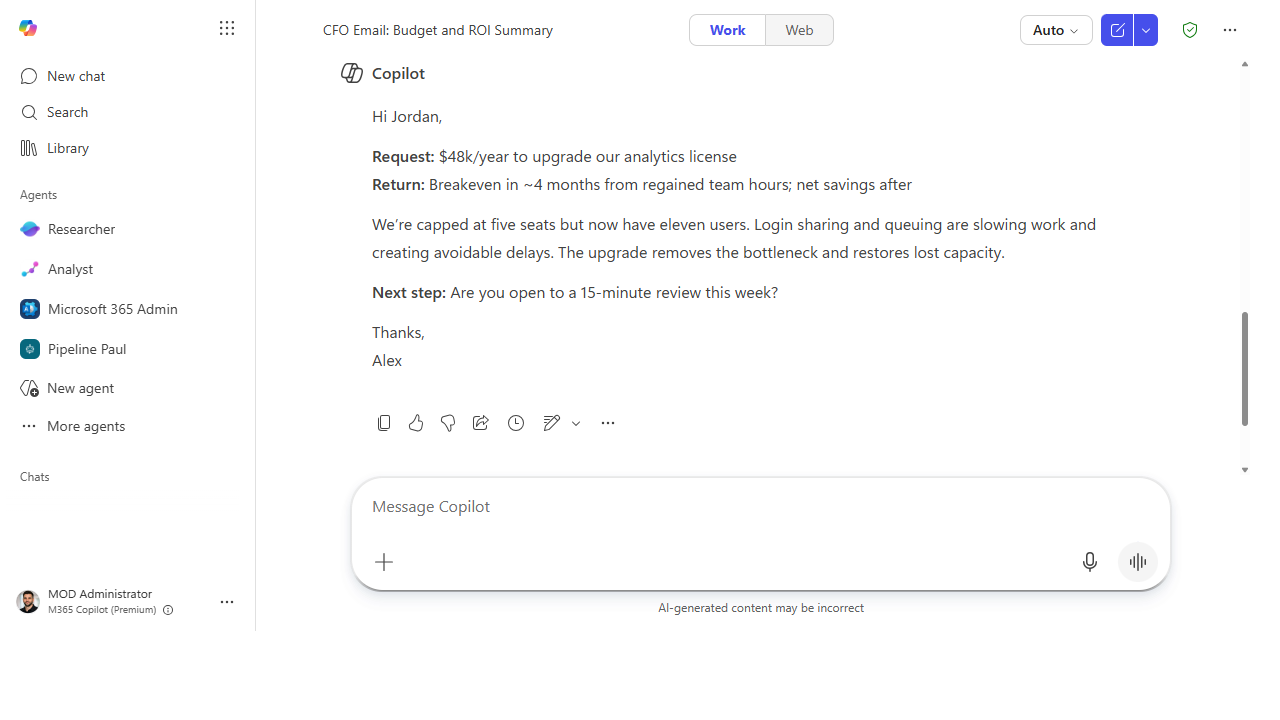 Get back a version that leads with the ask. Shorter, direct, one clear next step — facts intact.
Make it better
One draft, many audiences: - Write two versions. "Give me one version for the exec and one for the working team" — same facts, different altitude. - Pressure-test it. "What's the most likely objection to this email, and how would I preempt it?" - Match a house style. "Make it sound like the way I usually write — short sentences, no jargon" — Copilot adapts to the voice you describe.
📚 Learn more. The in-product Copilot Prompt Gallery has ready-made Outlook rewrite and tone prompts, and the Prompt Gallery adoption guide breaks down the prompting principles behind a good rewrite.
Watch out for
- You own the send. Copilot polishes wording; the judgment about whether to send, and to whom, stays yours. Re-read before you hit send.
- It can over-smooth. A rewrite can sand off a point you needed to make firmly. If the email had a real edge on purpose, make sure the new version keeps it.
- Facts are yours to verify. A rewrite shouldn't invent details — but confirm dates, names, and numbers survived the edit intact, especially in anything that commits you.
Where this leads (the ramp)
Rewriting one email is a single-prompt win. Soon you'll want Copilot to draft from your context — pull the thread, your calendar, the doc — not just polish text you already wrote. That pull-from-everything instinct is what the later stages automate, starting with letting prebuilt agents gather and reason for you in Stage 2.
Next: First-Party Agents → Deep-dive a topic with Researcher
Related
- Chat → Turn a meeting into tracked follow-ups — the Stage 1 flagship
- Chat → Catch up on a Teams thread you were @mentioned in — drafts a reply in place
- Stage 1 Resources: see
RESOURCES.md→ Copilot Chat
Thanks — glad it helped. Spotted something to improve anyway? Suggest it →
Sorry this didn't land. Tell us what broke → so we can fix that rung of the ramp.
Found an issue or want to suggest an improvement? Open a GitHub issue · Star on GitHub