Stand up a recurring weekly digest
Describe the Monday-morning digest you wish landed in your inbox — once — and let Cowork compile and send it every week without you lifting a finger.
Stage: Cowork · For: Champion, Manager · Level: Intermediate · Time: 10 min
When to use this
You already know the Stage 1 move: ask Copilot to summarize your week. The natural next thought is "why am I the one triggering this?" A recurring digest flips it around — instead of you pulling a summary when you remember, Cowork pushes one on a schedule. Monday at 8am, the week's signal is already waiting for you.
This is the gateway from one-off Cowork tasks to standing ones — the same delegation muscle, but now it runs on a clock.
What you'll need
- M365 Copilot license with access to Cowork
- The sources live where Cowork can reach them — your mailbox and Teams (and calendar for due dates)
- A clear picture of the digest you want: what's in it, how it's grouped, when it arrives
Try it now — the prompt
Describe the standing outcome, including the schedule. Cowork recognizes the cadence and sets up a recurring task:
Every Monday at 8am, summarize new high-priority emails and Teams messages since
Friday, plus anything due this week. Group it by theme, flag what needs my
attention first, and send me the digest. Keep it to one screen.
Why this works: it's a standing instruction — a cadence and time (Monday 8am), a scoped input (since Friday, high-priority), a transformation (group by theme, prioritize), and a delivery (send me, one screen). Same Cowork pattern as a one-off hand-off, except you describe it once and it repeats.
Step by step
- Describe the recurring outcome. Paste the task above. Cowork detects the "every Monday at 8am" cadence and proposes a recurring task, not a one-time run.
- Confirm the cadence and scope. Cowork shows you when it'll run and what it'll gather. Check the day, time, and source window before you approve.
- Review the first run. Don't trust-and-forget. Read the first digest end to end and confirm it's pulling the right mail and chats and grouping them sensibly.
- Refine the recipe in plain language: Cowork updates the standing task — every future run uses the new shape.
Screenshots
Captured live in Microsoft 365 Copilot (Work mode). The product UI moves fast — if what you see differs, trust the numbered steps above, which we keep current.
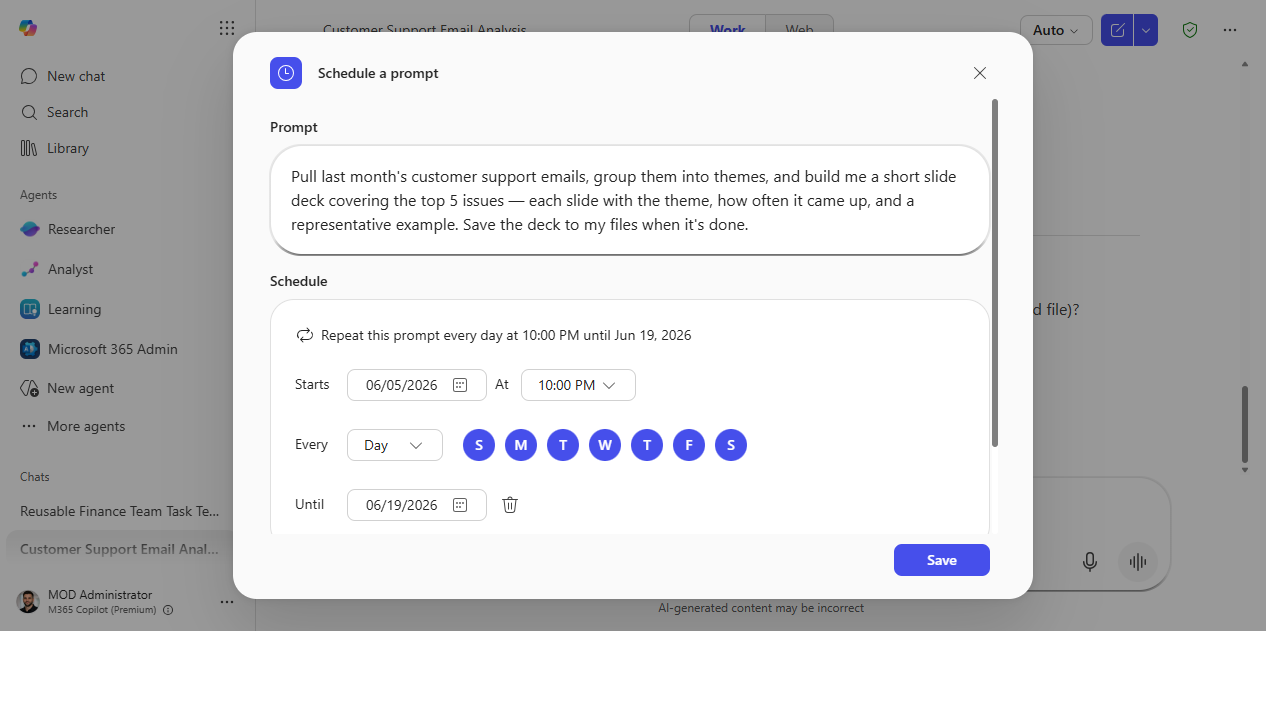 The Schedule a prompt panel turns a one-off task into a standing one — set the cadence, time, days, and end date, and Copilot reruns it on its own.
Make it better
A working digest for you is the seed of a digest for your team: - Send it to the team. "Post the digest to our team channel every Monday" turns a personal habit into a shared ritual. - Tighten or widen the lens. Scope it to one project, or broaden it to a whole portfolio — the recipe is one sentence to change. - Build a library of scheduled recipes. Champions: curate a handful of these standing tasks your team can each stand up — the same idea behind Sean Galliher's reusable Cowork recipes.
📚 Learn more. The community-built Cowork Cookbook by Sean Galliher (unofficial, like this site) is full of end-to-end Cowork recipes worth cribbing, and the M365 Copilot resources hub covers where Cowork sits in the broader product.
Watch out for
- Unattended means scope it tightly. A scheduled task runs without you in the loop — a loose source window ("all my email") means a noisy digest. The tighter the scope, the more useful the result.
- Babysit the first few runs. Confirm it's pulling the right things for two or three weeks before you fully rely on it. Drift happens.
- It runs with your access. The digest can surface anything you can see. Be deliberate before you forward it or post it to a channel.
Where this leads (the ramp)
A standing digest you've shaped once is a Cowork skill — a reusable capability, not a task you re-trigger. Watch what happens the first time a teammate says "can I get that Monday digest too?" You're no longer automating a task for yourself — you're packaging a process for other people. That's the jump from running tasks to building an agent: Stage 4 · Agent Builder, where the knowledge and the steps get bundled once, for everyone.
Next: Agent Builder → Build a team-knowledge agent over a SharePoint site
Related
- Cowork → Hand off an end-to-end task to Cowork — the Stage 3 flagship
- Chat → Draft a status update from your week's activity — the manual Stage 1 version this automates
- Stage 3 Resources: see
RESOURCES.md→ Cowork
Thanks — glad it helped. Spotted something to improve anyway? Suggest it →
Sorry this didn't land. Tell us what broke → so we can fix that rung of the ramp.
Found an issue or want to suggest an improvement? Open a GitHub issue · Star on GitHub