Publish and govern your agent
Building the agent is half the job — publishing it safely, to the right people, with an owner and a way to watch it, is the other half. This is how a working agent becomes a trusted one.
Stage: Copilot Studio · For: Maker, IT/Admin · Level: Advanced · Time: 20 min
Works on any harness — cost and coverage differ
This is a platform skill that applies whichever harness powers your agent. Keep one thing in mind: the standard and chat harnesses are covered by a Microsoft 365 Copilot license inside Microsoft 365 channels, while the GitHub Copilot harness bills Copilot Credits for all usage and a license never covers it. Compare the engines · estimate the net cost.
When to use this
Your agent works in test. Now it has to live in the real world — reachable by the right audience, running in the right environment, with someone accountable for it and a way to see how it's doing. The build was the exciting part; publishing and governance are what keep it from becoming an ungoverned bot nobody owns six months from now. This is the maturity step that separates a demo agent from a production one.
It's a genuine joint effort: makers own the publish, IT/admins own the environment, access, and lifecycle.
What you'll need
- Copilot Studio access with permission to publish in the target environment
- A tested agent and a clear answer to "who is this for and where does it run?"
- An owner — a named human accountable for the agent after launch — and IT's sign-off on data and access
Try it now — the prompt
Before you publish, use Copilot to build your own pre-flight checklist so nothing gets skipped:
Draft a pre-publish checklist for a Copilot Studio agent: audience and access,
environment, data sources it touches, named owner, what to monitor after launch,
and how a user reports a bad answer. Keep it to one page.
Why this works: it turns "ship it" into a governed decision — covering access, environment, data, ownership, monitoring, and feedback — so the questions IT would ask anyway are answered before launch, not after an incident.
Step by step
- Set the audience and environment. Decide exactly who can reach the agent and in which environment it runs — this is the single most consequential governance choice.
- Confirm the data and access scope with IT. Walk through every source the agent touches and confirm the audience is allowed to see all of it. Publishing widens who can trigger those reaches.
- Publish, then test as a real user. Publish to the chosen audience and immediately test from a non-maker account — the published experience can differ from the authoring view.
- Stand up the feedback loop:
Screenshots
Captured live in Microsoft Copilot Studio (Contoso environment). The product UI moves fast — if what you see differs, trust the numbered steps above, which we keep current.
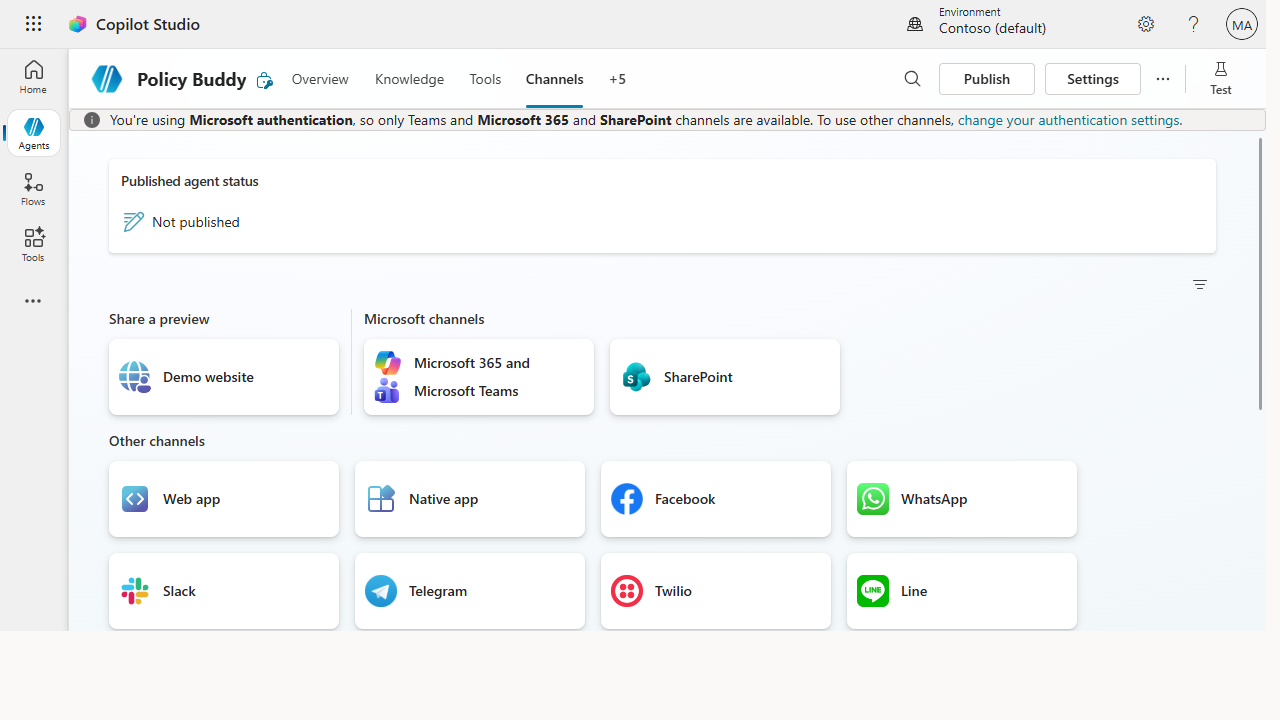 The Channels tab is the ship surface — publish once, then connect the agent to Teams, Microsoft 365, SharePoint, a website, and more.
Make it better
A published agent is a managed product, not a finished one: - Watch the transcripts. Real questions reveal gaps your tests didn't. The agent's misses are your next round of instructions and knowledge. - Version deliberately. Change in a dev environment, test, then promote — don't edit a live agent in place. Treat it like the software it is. - Plan the handoff. The maker who built it won't own it forever. Document how it works so the next owner inherits something maintainable, not a black box.
📚 Learn more. The Copilot Studio documentation covers publishing and lifecycle, and the Agent 365 resources collect Microsoft's guidance on governing agents at scale across the organization.
Watch out for
- Publishing widens the blast radius. An agent that was safe in test can surface content to people who shouldn't see it once the audience opens up. Re-verify access after publish, from a real user account.
- An unowned agent is a liability. Every published agent needs a named human who's accountable. "The team" owns nothing. Assign one person before launch.
- No monitoring means silent failure. An agent quietly giving wrong answers erodes trust without anyone noticing. The feedback loop and weekly review aren't optional — they're how you stay ahead of problems.
Where this leads (the ramp)
You've now taken an agent all the way — built, actioned, published, and governed. That's the full arc this cookbook set out to climb. From here it's repetition and scale: more agents, richer orchestration, and the organizational muscle to run a fleet of them. The resources below are where that depth lives.
Related
- Copilot Studio → Build your first Copilot Studio agent — the Stage 6 flagship
- Copilot Studio → Give a Studio agent a real action with a connector — what you publish
- Stage 6 Resources: see
RESOURCES.md→ Copilot Studio
Thanks — glad it helped. Spotted something to improve anyway? Suggest it →
Sorry this didn't land. Tell us what broke → so we can fix that rung of the ramp.
Found an issue or want to suggest an improvement? Open a GitHub issue · Star on GitHub