Seed your agent with starter prompts
A blank agent with a blinking cursor gets ignored — good starter prompts tell people what to ask on the first try, which is the difference between an agent that gets used and one that dies quietly.
Stage: Agent Builder · For: Maker, Champion · Level: Starter · Time: 10 min
When to use this
You built a capable agent and nobody's using it. The reason is almost never the agent — it's that the first-time user opens it, sees an empty box, doesn't know what it can do, and leaves. Starter prompts solve exactly this: they're the suggested questions on the agent's front door that show, in one glance, what it's for and how to ask. Three good ones can carry adoption further than another week of tuning.
This is a maker craft skill with a champion's payoff — it's the small authoring detail that decides whether your rollout lands.
What you'll need
- M365 Copilot license with Agent Builder access
- A working agent that already answers well (starter prompts amplify a good agent; they can't save a bad one)
- A sense of the top 3–4 jobs people will actually come to it for
Try it now — the prompt
Starter prompts should mirror real first questions. Draft them by asking yourself the user's job, then write the prompt as the user would:
Give me 4 starter prompts for this agent. Make each one a real question a new user
would actually type, cover the agent's main jobs, and phrase them so the answer
shows off what the agent does best. Keep each under 12 words.
Why this works: it anchors the prompts in real first-use intent, spreads them across the agent's core jobs, optimizes each to demonstrate value, and caps the length so they read as tappable suggestions — not paragraphs.
Step by step
- Open your agent's starter-prompt settings. Find where the suggested questions are configured — these are what a first-time user sees before they type anything.
- Write each as a real question, not a category. "Summarize the onboarding checklist" beats "Onboarding" — a question invites a tap; a label doesn't.
- Tap each one as a new user would. Confirm the answer is genuinely impressive — a starter prompt that leads to a weak answer teaches people the agent is weak.
- Refine the one that underwhelmed:
Screenshots
Captured live in Microsoft 365 Copilot Agent Builder (Work mode). The product UI moves fast — if what you see differs, trust the numbered steps above, which we keep current.
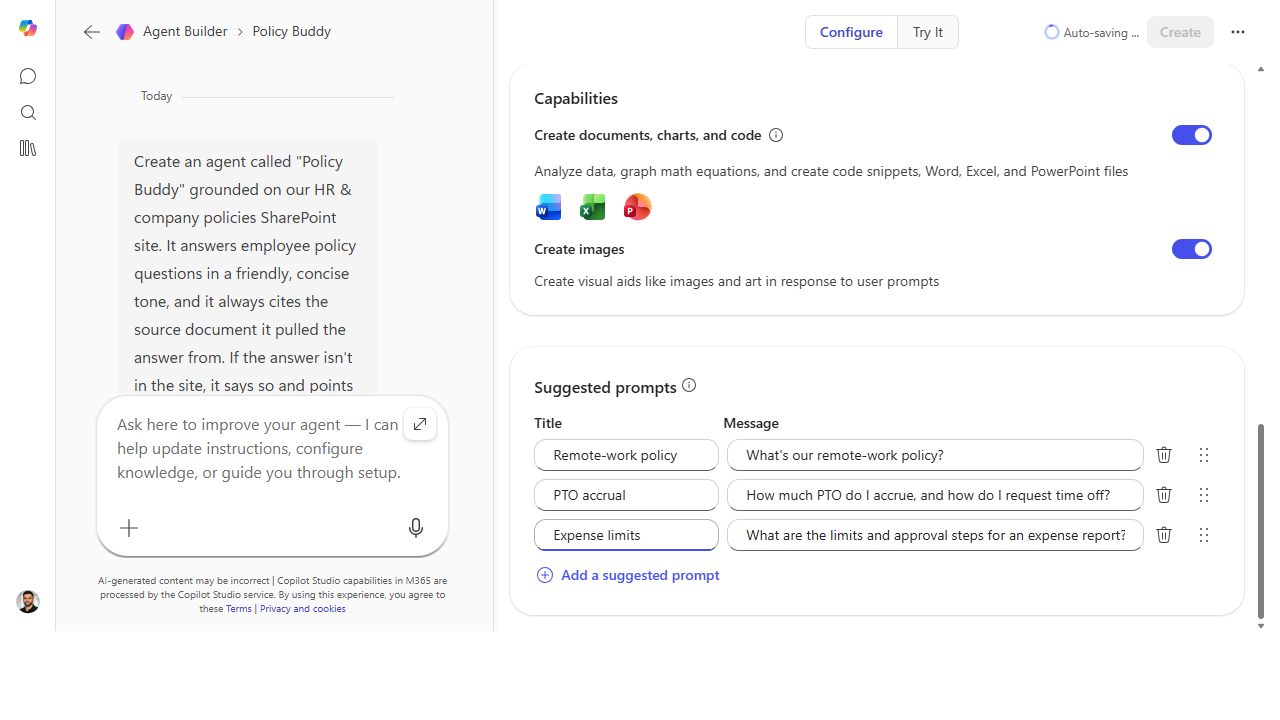 Each starter prompt is a title plus the real question it fires — give a new user a good answer in the first minute instead of a blank box.
Make it better
Starter prompts are a living signal: - Let usage rewrite them. If everyone's asking something your starter prompts don't cover, promote that real question into a starter — meet people where they already are. - Retire the dead ones. A starter prompt nobody taps is wasted real estate. Swap it for the next most common question. - Pair them with the announcement. When you launch the agent, lead the post with one starter prompt as the "try this first" — the front door and the announcement should say the same thing.
📚 Learn more. The curated agent resources and the Copilot Studio resources hub collect Microsoft guidance on authoring and rolling out agents that people actually adopt.
Watch out for
- Starter prompts set expectations — keep the promise. If a suggested prompt implies the agent can do something it can't do well, the first impression is a letdown. Only feature what it nails.
- Don't overload the door. Four sharp prompts beat eight mediocre ones. Too many choices reads as noise and nobody taps any of them.
- They're not a substitute for instructions. Great starter prompts on a poorly-instructed agent just get people to a bad answer faster. Fix behavior first; then seed the door.
Where this leads (the ramp)
You've now made an agent both capable and discoverable — and you may be bumping into the ceiling of what the lightweight builder allows. When you want real connectors, publishing controls, and analytics, that's the graduation to Stage 6 · Copilot Studio.
Next: Copilot Studio → Build your first Copilot Studio agent
Related
- Agent Builder → Build a team-knowledge agent over a SharePoint site — the Stage 4 flagship
- Agent Builder → Give your agent a persona and instructions that stick — the behavior companion
- Stage 4 Resources: see
RESOURCES.md→ Agent Builder
Thanks — glad it helped. Spotted something to improve anyway? Suggest it →
Sorry this didn't land. Tell us what broke → so we can fix that rung of the ramp.
Found an issue or want to suggest an improvement? Open a GitHub issue · Star on GitHub