Hand off an end-to-end task to Cowork
Describe an outcome, not a prompt — and let Cowork plan and run the steps across your email, files, and apps until a finished deliverable lands in your hands.
Stage: Cowork · For: Champion, End user · Level: Intermediate · Time: 15 min
When to use this
Stage 1 was one prompt, one answer. Stage 2 let an agent handle one job (meeting notes) on autopilot. Cowork is the next rung: you hand off a whole multi-step task and let Copilot do the planning, the tool-hopping, and the assembly for you.
The tell that you're ready: you catch yourself thinking "this would take me an afternoon — pull the emails, sort them, find the patterns, build the slides." That chain of steps is exactly what Cowork is for. You stop being the one who runs each step and become the one who reviews the result.
What you'll need
- M365 Copilot license with access to Cowork
- The source material lives somewhere Copilot can reach — your mailbox, OneDrive/SharePoint, or Teams (no need to gather it first; that's part of the task)
- A clear outcome in your head — the what, not the how
Try it now — the prompt
Describe the end-to-end outcome in one go. Don't break it into micro-steps — that's Cowork's job:
Pull last month's customer support emails, group them into themes, and build me a
short slide deck covering the top 5 issues — each slide with the theme, how often it
came up, and a representative example. Save the deck to my files when it's done.
Why this works: you named the input (last month's support emails), the transformation (group into themes, rank top 5), and the deliverable (a saved slide deck with a defined per-slide shape). Cowork turns that into a plan, executes each step, and shows its work — you're delegating the sequence, not narrating it.
Step by step
- State the outcome. Paste the task above (swap in your own). Cowork reads it and lays out a plan — the steps it intends to take — before it runs them.
- Let it work, and watch the steps. Cowork searches your mailbox, clusters the emails, ranks the themes, and drafts the deck. Each step is visible as it runs, so you can follow the reasoning.
- Review the deliverable. When it finishes, you get the actual slide deck — not a description of one. Open it and check the themes and examples against what you know.
- Refine in plain language. Same conversational follow-ups as every other stage: Cowork reruns just what's needed and updates the deck.
Screenshots
Captured live in Microsoft 365 Copilot (Work mode). The product UI moves fast — if what you see differs, trust the numbered steps above, which we keep current.
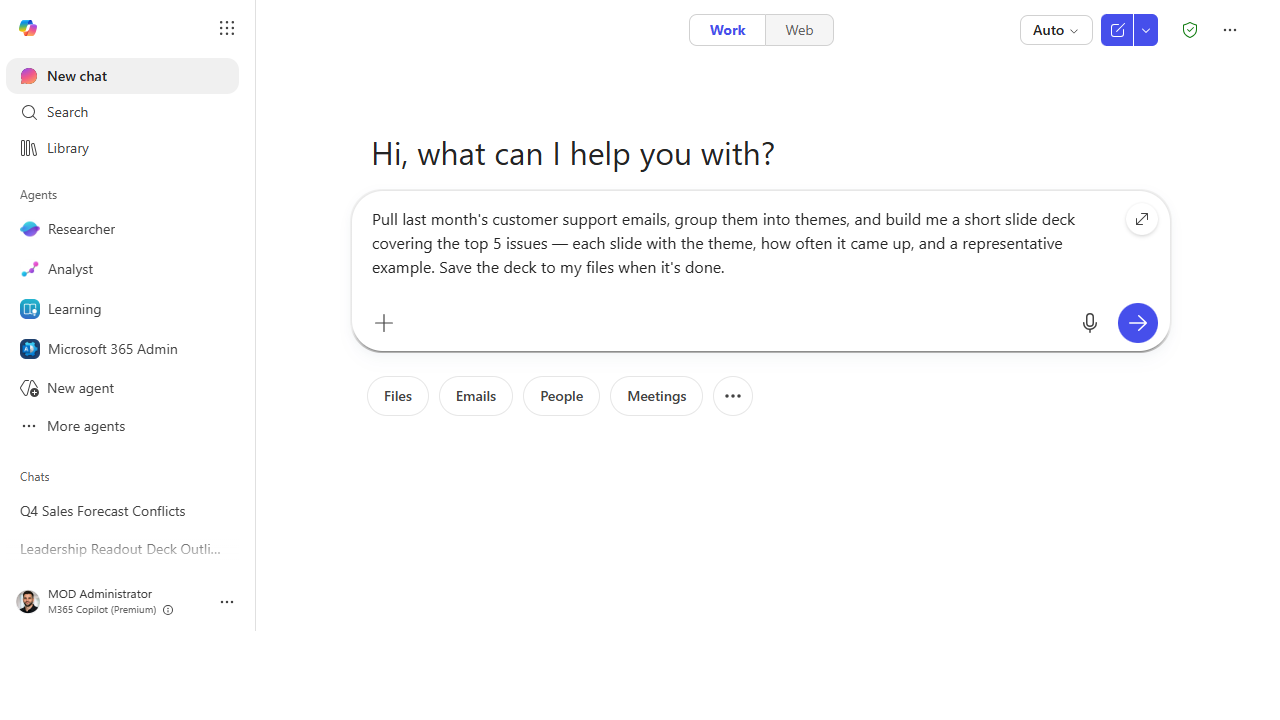 Describe the outcome, not the steps — the whole multi-step task goes in as a single hand-off.
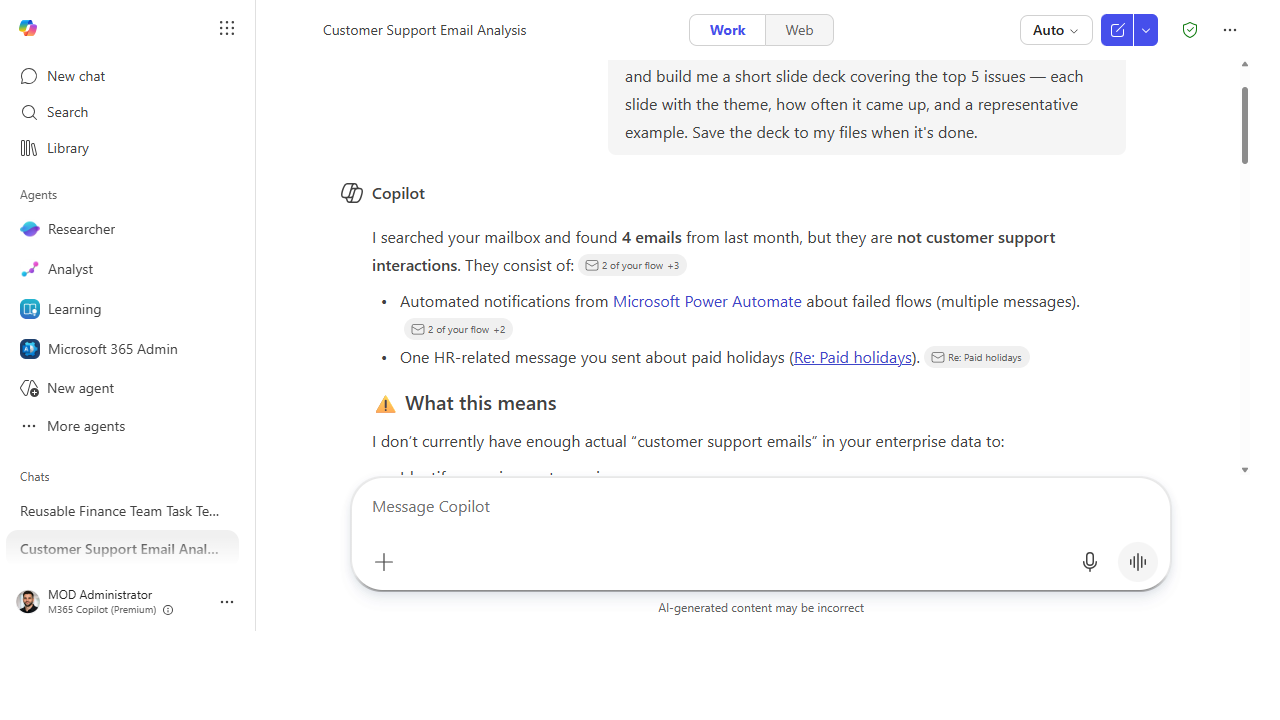 Cowork reads the task, searches your real data, and grounds its plan — here it transparently reports what it found in the mailbox (with citations) rather than fabricating a deck from data it doesn't have.
Make it better
Once a one-off hand-off feels natural, push on the two dimensions that make Cowork pay off: - Make it recurring. "Every Monday at 8am, summarize last week's support emails and send me the digest." A task you describe once can run on a schedule. - Feed it more sources. Point it at several documents at once and ask for one reconciled brief, flagging where they disagree. - Build a reusable library. Champions: curate a handful of these task descriptions your whole team can rerun — the same idea behind Sean Galliher's process-based recipes.
📚 Learn more. Our explicit inspiration for this stage is the community-built Cowork Cookbook by Sean Galliher — Cowork applied across 15 end-to-end business processes. (Unofficial, like this site.) For where Cowork sits in the broader product, see the M365 Copilot resources hub.
Watch out for
- Outcome in, not steps in. The instinct to micro-manage ("first search, then sort, then…") actually gives worse results. Describe the finished thing and the inputs; let Cowork plan the middle.
- Review before you ship. Cowork produces a real deliverable — verify the facts, examples, and numbers before forwarding it. Delegation isn't abdication.
- Scope the inputs. "Last month's support emails" grounds it; "all my email" doesn't. The tighter the source, the better the result.
Where this leads (the ramp)
Notice what just happened: you delegated a repeatable process. The next question writes itself — "if I do this every week, could I give the whole team a button for it?" That's Stage 4 · Agent Builder, where you stop describing a task each time and start building a simple agent that packages the knowledge and the steps once, for everyone. You've gone from using to the doorstep of making.
Next: Agent Builder → Build a team-knowledge agent over a SharePoint site
Related
- First-Party → Auto-recap every meeting with Facilitator — the single-job version of delegation
- Cowork → Stand up a recurring weekly digest
- Stage 3 Resources: see
RESOURCES.md→ Cowork
Thanks — glad it helped. Spotted something to improve anyway? Suggest it →
Sorry this didn't land. Tell us what broke → so we can fix that rung of the ramp.
Found an issue or want to suggest an improvement? Open a GitHub issue · Star on GitHub